


 Product image for reference only


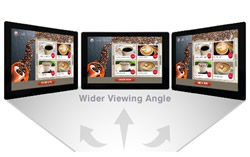
Make the most of In-Plane Switching (IPS) technology in the display panel to get faster response times, wider viewing angles, better color reproduction and sunlight visibility, and a longer lifespan.

A popular choice of the larger widescreen monitors, a 27" monitor is a great size for productivity and gaming without a significant increase in cost when compared to larger widescreen and ultrawide options.

Get up to 120 FPS and avoid motion sickness when gaming with a 120Hz gaming monitor.

Get smooth and responsive-to-control gaming experience on a high-resolution large format display with 4ms response time.

Take advantage of the most commonly used media output interface in modern laptops and desktops with a direct HDMI input on the monitor. No adapters needed.

Take advantage of the most commonly used media output interface in modern business grade laptops and desktops with a direct Display Port input on the monitor.
 Ask Us About Acer AcerB278U G 27" FLAT IPS QHD 4ms 120Hz 1xHDMI 1xDP1.2 1xDPOUT 1xUSB TYPE C 100W 3xUSB 3.2 RJ45 SPK VESA HEIGHT ADJUSTABLE IR WEBCAM 3Yr WTY
 Price Match Acer AcerB278U G 27" FLAT IPS QHD 4ms 120Hz 1xHDMI 1xDP1.2 1xDPOUT 1xUSB TYPE C 100W 3xUSB 3.2 RJ45 SPK VESA HEIGHT ADJUSTABLE IR WEBCAM 3Yr WTY
Don't have an account?
Become a Reseller »