


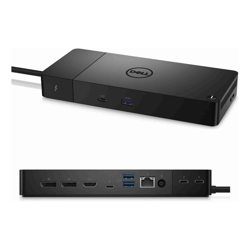
 Product image for reference only


Experience uninterrupted productivity with lightning-fast charging and no compromise on performance with the world's first modular Thunderbolt 4 dock.
Hardware Requirements
Ensure your system has a USB-C port with Thunderbolt (Recommended) or DisplayPort Alt Mode (Supported)
Non-Thunderbolt Systems
The WD22TB4 will function as a WD19 on Dell laptops that do not have a Thunderbolt port. The Thunderbolt 4 ports on the dock will not support video or Thunderbolt specifications.
Dock Interface
Thunderbolt 4
Display Support
Up to Four
Video Ports
2 x DP, HDMI, USB-C, 2 x Thunderbolt 4
USB Ports
3 x USB-A, 2 x USB-C
Power Delivery
Up to 130W
Network
Gigabit Ethernet
Declutter your workspace
Connect multiple peripherals and displays with a single cable, featuring HDMI, DisplayPort, Gigabit Ethernet, and more USB ports.
Maximize productivity
Connect multiple 4K displays and Thunderbolt peripherals without compromising your work setup.
Increase your power delivery
Dell ExpressCharge technology* enables 80% charge in one hour* and can deliver up to 130W on Dell devices.
Industry standard compatibility
The Dell Thunderbolt Dock is also compatible with notebooks from other manufacturers which support industry standard Thunderbolt docking.
Front
1. USB-C 3.2 Gen 2 | 2. USB-A 3.2 Gen 1
Rear
3. DisplayPort (2) | 4. HDMI 2.0 | 5. Multifunction USB-C | 6. USB-A 3.2 Gen 1 (2) | 7. Gigabit Ethernet (RJ45) | 8. Power In | 9. Thunderbolt 4 (2)
*Only available with Dell notebooks. Within Dell Power Manager software, selecting ExpressCharge can recharge system battery from 0% to 80% within 60 minutes. After charging has reached 80% capacity, charging speed will return to normal speed. Recommended for use within the provided Dell power adapter, not recommended with a smaller capacity power adapter. Charging time may vary +/- 10% due to system tolerance.

Take advantage of the most commonly used media output interface in modern laptops and desktops with a direct HDMI input on the monitor. No adapters needed.

Why pay more for new when you can go refurbished and save? With savings of up to 70% on Laptops, Desktops, Servers, Networking and even Apple you would be crazy to think twice. With no significant advances in computer technology in the last 3-5 years there's never been a better time to save by buying refurbished.
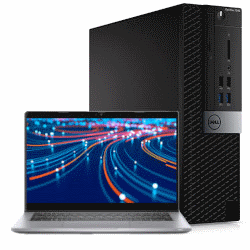
All refurbished units we sell are rigorously tested and cleaned to ensure they are in A-Grade condition and are ready to use straight out of the box. Although some units may have some minor cosmetic blemishes and imperfections such as minor scratches or other minor surface imperfections they have all been tested and are guaranteed to work like new.

We stand by our products and back any refurbished equipment we sell with a 12-Month Warranty (unless otherwise specified). Our warranty covers any hardware faults that may arise within this period.
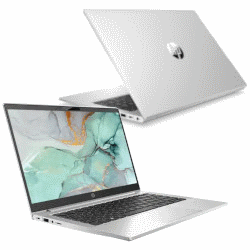
All refurbished units we sell are from the tough commercial grade product lines from the leading manufacturers including Dell, HP and Lenovo. When sold new these units have premium pricing reflectively of their superior build quality.
Most refurbished units we sell come from large enterprise and government departments and have had a good life and have been well looked after. Due to this, the longevity of a refurbished commercial units is often higher than that of consumer grade equipment.

All our refurbished products undergo a rigorous quality assurance procedure. This involves the units being wiped of sensitive data, tested, cleaned and re- installed with a fresh genuine copy of the operating system to match the attached Microsoft Certificate of Authenticity (COA). This ensures that the unit you receive is ready to plug in, turn on and use straight out of the box.
We are a Microsoft Registered Refurbisher so you can have peace of mind that any refurbished unit you purchase from us will meet your expectations and be up to the task.
| Model | WD22TB4 |
| Dock Interface | Thunderbolt 4 (USB-C) |
| Display Support |
Thunderbolt systems For a HBR2 PC Three QHD @ 60Hz, or Two 4K @ 60Hz For a HBR3 PC Four QHD @ 60Hz, or Two 4K @ 60Hz For a HBR3 PC with DSC Four 4K @ 60Hz
Non-Thunderbolt systems For a HBR2 PC Two FHD @ 60Hz, or One 4K @ 30Hz For a HBR3 PC Three FHD @ 60Hz, or One 4K @ 30Hz For a HBR3 PC with DSC Three QHD @ 60Hz, or One 4K @ 60Hz
HBR (High Bit Rate) is a DisplayPort standard which determines the bandwidth available for displays. Please refer to your notebook’s specifications to identify the HBR version. |
| Video Interfaces |
2 x DisplayPort 1 x HDMI 1 x USB-C 2 x Thunderbolt 4 |
| USB Ports |
1 x USB-C 3.2 Gen 2 (10 Gbps) with DisplayPort 1 x USB-C 3.2 Gen 2 (10 Gbps) 3 x USB-A 3.2 Gen 1 (5 Gbps) |
| Network | Gigabit Ethernet (RJ-45) |
| Security Slots |
Kensington lock slot Noble Wedge lock slot (cable locks not included) |
| Power Delivery |
Up to 130W Up to 90W to Non-Dell systems |
| Dimensions | 205 x 90 x 29 mm |
| Weight |
650 g (without power adapter) |
| What's Included |
Docking station 180W Power adapter Power cord |
| Condition | Refurbished |
| Warranty | 12 months |
 Ask Us About Dell WD22TB4 Thunderbolt 4 Dock Quad Display 2 x Thunderbolt 4 2 x DP HDMI USB-C 5 x USB Ports RJ45 Ethernet 130W Power Delivery 12 Mth Wty (Refurbished)
 Price Match Dell WD22TB4 Thunderbolt 4 Dock Quad Display 2 x Thunderbolt 4 2 x DP HDMI USB-C 5 x USB Ports RJ45 Ethernet 130W Power Delivery 12 Mth Wty (Refurbished)
Don't have an account?
Become a Reseller »